
Kenvara
Reviews and retirement
Review dates and reminders, what happens when the problem behind a known error is fixed, reopened or deleted, and how to hold a retirement.
Why known errors are reviewed
A known issue on the portal is only useful while it is true. Kenvara keeps it true in two ways: every published known error has a date by which someone should check it, and a known error written from a problem follows that problem’s status.
Review dates
Every publish sets a Review by date. On that date Kenvara marks the known error as due for review.
When you have checked it, open the known error and select “Record review for KE-12”. While the review is due, the same button is also in the Known errors panel of the work items it is linked to. Either button sets the next review date to the review interval from today, and the result gives that date.
On the Kenvara page of Space settings, under “Optional: publishing and review”, a project administrator sets:
- Review every (days): from 30 to 365 days; 90 by default.
- Overdue after (days): how long after its review date a known error counts as overdue; 14 by default.
- Send review reminders: on by default.
Save settings saves these with the rest of the page.
To find known errors that need a review, choose Show: Review due on the workbench, then select Show results.
Review reminders
Kenvara’s daily checks send one reminder when a known error falls due for review, another when it becomes overdue, and then one every 30 days while it stays overdue. Each goes through Jira’s own notifications on the work item the known error was written from. In this version the reminder goes to that work item’s assignee. Jira’s notification settings for the site decide whether it is delivered. While Jira’s rate limit for apps on the site is very low, reminders and automatic retirements wait for a later daily run.
The reminder names the service project and the review date, and carries a link that opens the known error in the Known errors workbench. It does not name the known error or quote any of its text, because it travels through a mail system Kenvara does not control. If Kenvara could not form the link, the reminder asks the reader to open the workbench instead. It says to use the workbench’s Review due filter, the option of that name under Show.
A known error with no source work item, or whose source was deleted, gets no reminder: the workbench’s Review due filter is how to find it.
When the problem is fixed
For a known error written from a problem, Kenvara watches the problem’s status category, never its status name.
When the problem moves to a status in the Done category:
- the known error is marked Fix available, and it retires automatically after a grace period;
- on the portal it reads “Fix released.” and moves below known issues that are not yet fixed;
- the grace period is “Retire after a fix is released (days)” on the Kenvara page of Space settings, 14 days by default.
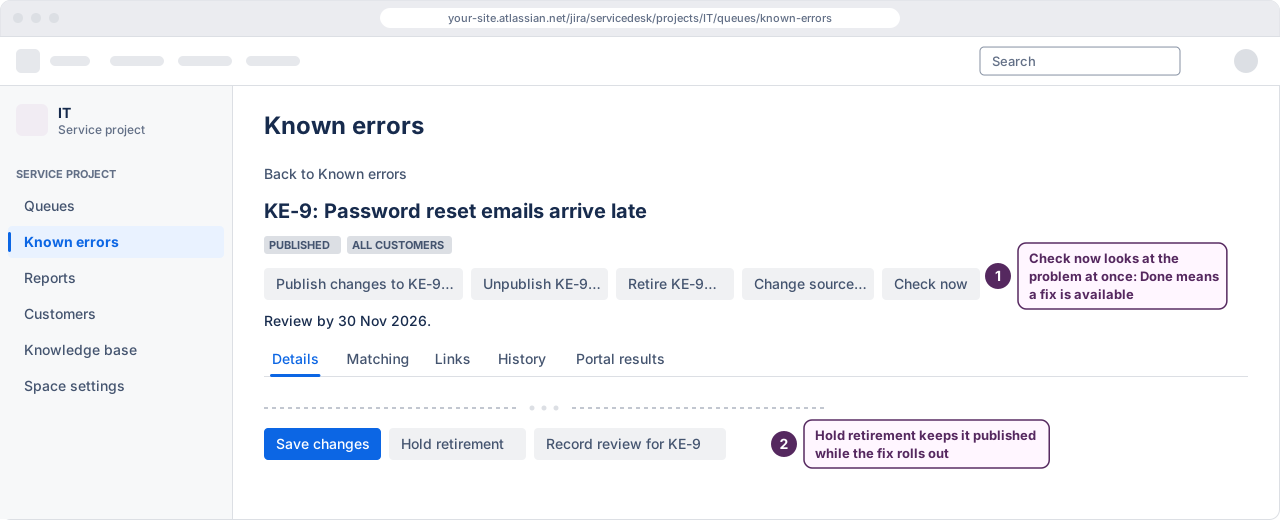
The known error’s row in the Known errors list, and the known error itself when you open it, read “Fix available. Retires on” and the date. Kenvara notices the change from the problem’s status as it happens, and its daily checks repair anything missed. To check at once, select Check now on a known error written from a problem.
 (opens the full-size illustration)
There are two exceptions, where the known error stays published because no fix is coming:
- its workaround status is Permanent: no fix is planned;
- the problem was closed with a resolution that a project administrator has marked as meaning “not fixed”, on the same settings page.
If the problem leaves Done before the known error retires, the Fix available mark is cleared and the known error stays published. Before retiring a known error automatically, Kenvara reads the problem again, and leaves the known error alone if it is no longer Done.
Incidents never drive this. A known error written from an incident is retired by hand.
Holding a retirement
To keep a fixed problem’s known error on the portal for longer, for example while the fix rolls out, a publisher opens it and selects Hold retirement. The button shows only once the known error is marked Fix available. The known error stays published until a publisher selects Release hold, and then retires on the date shown unless its problem reopens.
When the problem is deleted
If the problem or incident a known error was written from is deleted, Kenvara takes the known error off the portal at once and makes it a candidate again. The record reads: “Source deleted. Customers cannot see this known error until a publisher chooses a new source.” Use Show: Source deleted to find these.
A publisher can then select Change source… and enter the key of another problem or incident in the same service project. The known error follows its new source from then on, and can be published again. If no source fits, retire or withdraw it.
If a work item a known error is merely linked to is deleted, the link goes, and nothing else changes.
The daily checks
Kenvara runs its checks once a day: reminders, automatic retirements, and repairs for anything a status change missed. The Kenvara page in Apps administration says when they last ran. If they have not run for more than a day, it says what is waiting, and to contact Kenvara support if it continues.
While the licence is not active
While Kenvara’s licence is not active, customers see nothing from Kenvara, so nothing it shows can go stale on the portal. Recording a review and holding a retirement wait until the licence is active again, and so does changing a source.