
Kenvara
Publishing and audiences
Who may publish, the three audiences, what the publish dialog asks for, and how to unpublish, retire, withdraw or reopen a known error.
Who may publish
Publishing, unpublishing, retiring and reopening are for publishers, and so are holding a retirement and changing a known error’s source. A service project’s publishers are its project administrators, or, if a project administrator chose one under “Who can publish” on the Kenvara page of Space settings, the members of that project role as well.
Anyone else who opens a known error reads that only project administrators, or members of the publishing role set on the Kenvara page of Space settings, can publish, unpublish, retire or reopen known errors in this project.
Four-eyes publishing. On the same page, “Four-eyes publishing: the person who last changed the customer text cannot publish it” stops anyone publishing their own words. With it on, a publisher who made the last change to the customer text is asked to find another publisher. It is off by default.
Before you publish
A known error needs these before it can be published:
- a Title and a Summary;
- Symptoms, as customers notice them;
- a Workaround for customers, or, if the workaround status is “None yet”, a Message for customers saying what they should know meanwhile;
- a Review by date, chosen in the publish dialog.
The customer-facing text is also checked against what customers’ screens can show: see “Writing text that customers read” in The workbench.
The publish dialog
On the record, select “Publish KE-12…”. For a known error that is already published, the action reads “Publish changes to KE-12…”: use it to publish edits made since, or to change the audience or the review date.
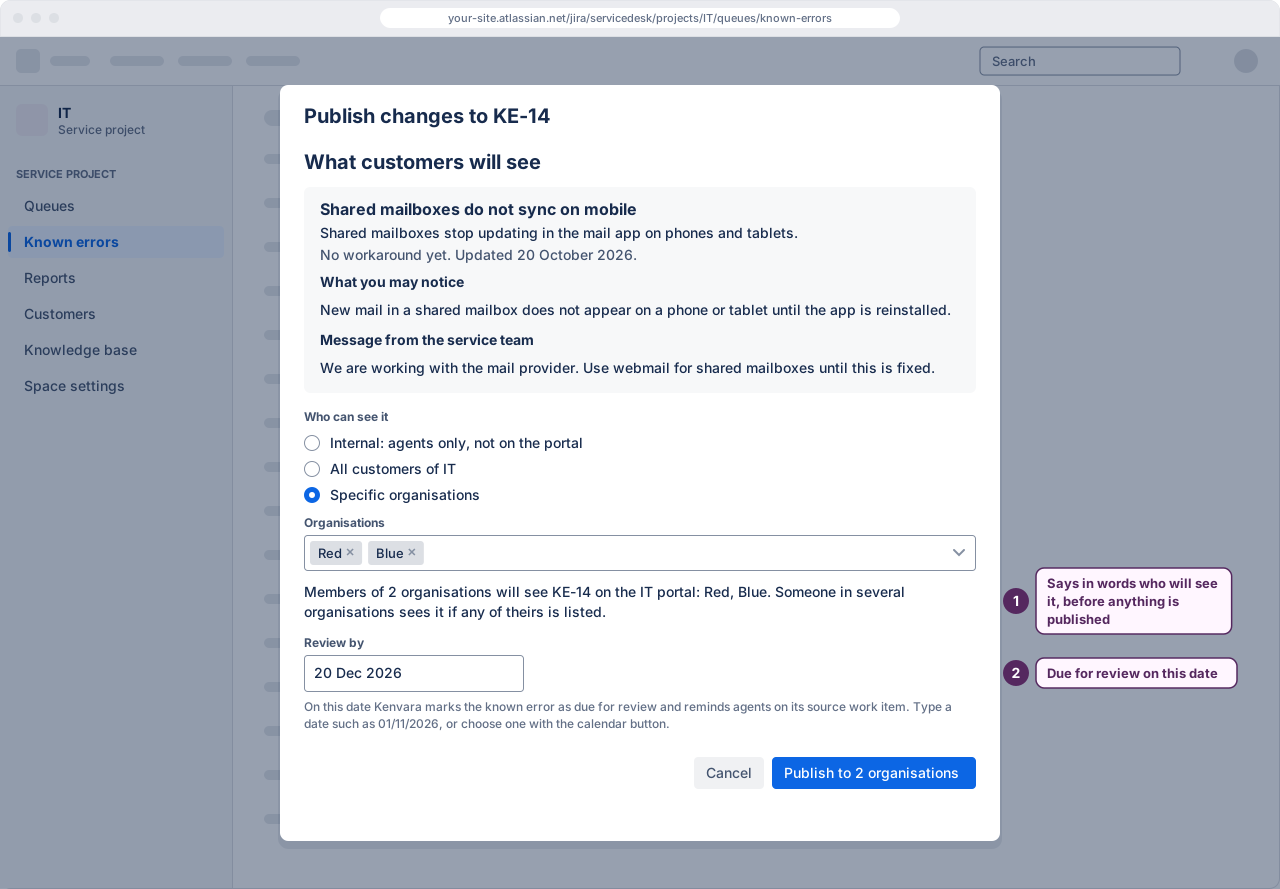
The dialog opens with What customers will see: the known issue as the portal will show it.
- Who can see it. Choose “Internal: agents only, not on the portal”, “All customers of IT” (named with your service project) or “Specific organisations”.
- Organisations, for Specific organisations: choose each customer organisation that may see it from the list. The list holds the organisations attached to this service project in Jira.
- Read the sentence under the choice. It says in words who will see the known error and where, for example which portal surfaces show it. If the project’s portal surfaces are off, it says customers will not see it until a project administrator turns them on. With Specific organisations chosen and no organisation picked yet, it asks you to choose at least one.
- Review by. Choose a date with the calendar button: a date typed in numbers can be read month first, and one typed in words is not taken. On that date Kenvara marks the known error as due for review: see Reviews and retirement.
- Publish. The button names what will happen: “Publish internally”, “Publish to all customers” or “Publish to 2 organisations”. If something is still missing, the dialog says “KE-12 cannot be published yet” and lists what to add, such as a review-by date or, for specific organisations, at least one organisation.
The result names the revision published, its audience and its review date, for example “KE-12 is published. Revision 1 is published to all customers of IT. Review by 14 Jan 2027.” Cancel leaves the record as it was.
 (opens the full-size illustration)
With four-eyes publishing on, a publisher who made the last change to the customer text sees no Publish button, only a note asking another publisher to publish it.
The three audiences
Internal keeps the known error inside the team. It is never on the portal.
All customers shows it to everyone who can use this service project’s portal, on each portal surface the project has turned on.
Specific organisations shows it only to members of the organisations chosen. Someone who belongs to several organisations sees it if any of theirs is chosen, and on the portal it is labelled with their own organisations only, never the others.
When you publish to specific organisations, Kenvara checks each one against the organisations attached to this service project, reading them as you. An organisation that is no longer attached, or has been deleted or changed, is refused by name, and nothing is published: remove it from the audience, or attach it to the service project in Jira and publish again. Kenvara checks the first 1,000 organisations attached to a service project.
What specific organisations reach in this version
Customers who use the portal with a portal-only account see a known error published to their organisation. That was checked on 13 October 2026 with customers in one organisation, in two, and in none, on two service projects.
Customers who sign in with an Atlassian account are handled differently, and in this version with limits. They are scoped by organisation only once Kenvara’s daily check of the site’s organisations covers three or more organisations and is current. Until then, and for anyone who belongs to more than half of the site’s organisations (and at least three of them), or to an organisation created since the last check, they see only known issues published to all customers. Atlassian’s platform checks for these customers passed on 14 October 2026, with external customers who sign in with an Atlassian account.
The Kenvara page in Apps administration says whether Atlassian-account customers are shown organisation-scoped known issues, and, if not, why. See Organisations and MSPs.
Unpublish, retire, withdraw, reopen
Each action names the record and asks first.
- Unpublish KE-12… takes it off the portal and makes it a candidate again. Customers stop seeing it from their next page load; its history is kept.
- Retire KE-12… ends it. Customers stop seeing it from their next page load. The dialog asks for a reason: “No longer needed” or “Replaced by another known error”.
- Withdraw KE-12… is for a candidate: one that is not on the portal, whether it was never published or was published and then taken off. Withdrawing retires it and frees its problem or incident for a new known error. It does not need a publisher: in this version any agent on the service project can withdraw a candidate.
- Reopen KE-12… makes a retired known error a candidate again. Customers do not see it until it is published again.
After each one, the same button takes the next action the record offers: an unpublished record offers “Publish KE-12…”, a retired one “Reopen KE-12…”.
While the licence is not active
Nothing can be published, edited or reopened while Kenvara’s licence is not active, and customers see nothing from Kenvara. Recording a review, holding a retirement and changing a source wait too. Unpublishing, retiring and withdrawing still work, because they only take things away, and so does unlinking a work item.