
Kenvara
Organisations and MSPs
How Kenvara decides which customer organisations see a known error, how fast a removal takes effect, what Atlassian-account customers see in this version, and how to offboard a client safely.
Who sees an organisation’s known errors
A known error published to specific organisations is shown on the portal only to members of those organisations, on the service project it belongs to. Kenvara decides this on its own server, on every page view, from three things only:
- who the viewer is, as Atlassian reports them to Kenvara;
- which Jira Service Management customer organisations the viewer belongs to;
- the organisations the known error was published to.
Anything Kenvara cannot work out means hidden. A failed lookup, an unknown kind of viewer or a missing value hides the known error rather than showing it.
Kenvara never uses a request’s Organizations field, its participants, or Jira Service Management’s request-sharing settings to decide who sees what. Membership of the customer organisation is the only thing that counts.
Membership is Jira Service Management’s
Kenvara treats an organisation’s member list as the truth. Anyone in the organisation sees its known errors; anyone removed stops seeing them. So the list has to be right, and two things in Jira Service Management can put people into an organisation without anyone choosing them:
- Email domains on an organisation. An organisation with an email domain takes in any account at that domain. In Kenvara’s own testing, an agent raising a request on behalf of an address at the domain was enough to create the account and make it a member, with the address never proved.
- Open sign-up. If the portal lets anyone sign up, anyone who can use an address at the domain joins the organisation.
So, for a client organisation you publish known errors to:
- do not put an email domain on it;
- do not combine open sign-up with email-domain grouping;
- after any change to its domains, review its members.
Customers in several organisations, or in none
Someone in several organisations sees a known error if any of their organisations is in its audience. On the portal it carries a label naming their own organisations only, for example “For your organisation: Blue.” It never names an organisation they are not in, and never says how many others there are.
A customer in no organisation sees known errors published to all customers, and nothing published to specific organisations.
How fast a removal takes effect
When someone is removed from an organisation, they stop seeing its known issues within 2 minutes at Kenvara’s default setting. Jira may take longer to report a removal. A page already open keeps what it showed until it is reloaded. When a removal must take effect at once, unpublish the known issue or change its audience first.
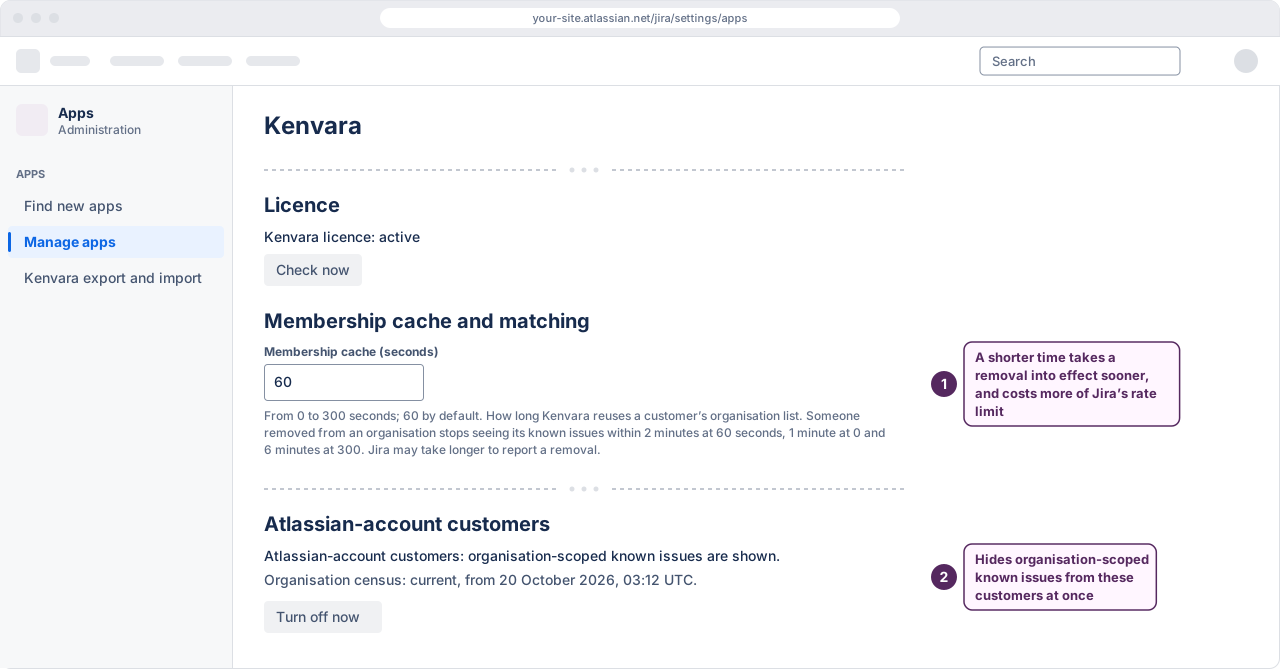
The membership cache is how long Kenvara reuses a customer’s organisation list before asking again: 60 seconds by default, from 0 to 300 seconds. The 2 minutes are that time plus Atlassian’s own delay, rounded up to whole minutes; at 0 seconds it is 1 minute, and at 300 seconds 6 minutes. A Jira administrator sets it under “Membership cache (seconds)” on the Kenvara page in Apps administration. A shorter time means a removal takes effect sooner, and costs more of Jira’s rate limit for apps on the site; the page gives the removal time for each setting.
A page that is already open keeps what it showed until the customer reloads it or expands a known issue. Joining an organisation works the same way: a new member sees its known errors within the same time.
Atlassian-account customers in this version
Customers who use the portal with a portal-only account are scoped by organisation as described above.
Customers who sign in with an Atlassian account are scoped by organisation in this version only once Kenvara’s daily check of the site’s organisations covers three or more organisations and is current. Until then, and for anyone who belongs to more than half of the site’s organisations (and at least three of them), or to an organisation created since the last check, they see only known issues published to all customers. Atlassian’s platform checks for these customers passed on 14 October 2026, with external customers who sign in with an Atlassian account.
The daily check first runs the day after the first known issue is published to specific organisations, and again every day while one is. A check more than two days old no longer counts.
On the Kenvara page in Apps administration, under “Atlassian-account customers”:
- one line says whether Atlassian-account customers are shown organisation-scoped known issues, and if not, why;
- “Organisation census” says whether the daily check is current, and when it ran; “not run yet. It runs daily.”; “not used”, when the site has fewer than three organisations; or “unavailable”, when the last check failed, was incomplete or is too old;
- Turn off now stops showing organisation-scoped known issues to Atlassian-account customers at once, after you confirm it. They then see only known issues published to all customers until an administrator selects Re-enable. Portal-only customers are not affected. Re-enable is offered only while Kenvara’s licence is active.
 (opens the full-size illustration)
Kenvara also turns this off by itself if its safety check sees a lookup answer it cannot trust, or if the organisation census sees an answer that lists every organisation on the site. The line then says when, and asks you to tell Kenvara support before you select Re-enable, because it may be a fault in Atlassian’s platform.
Preview as organisation
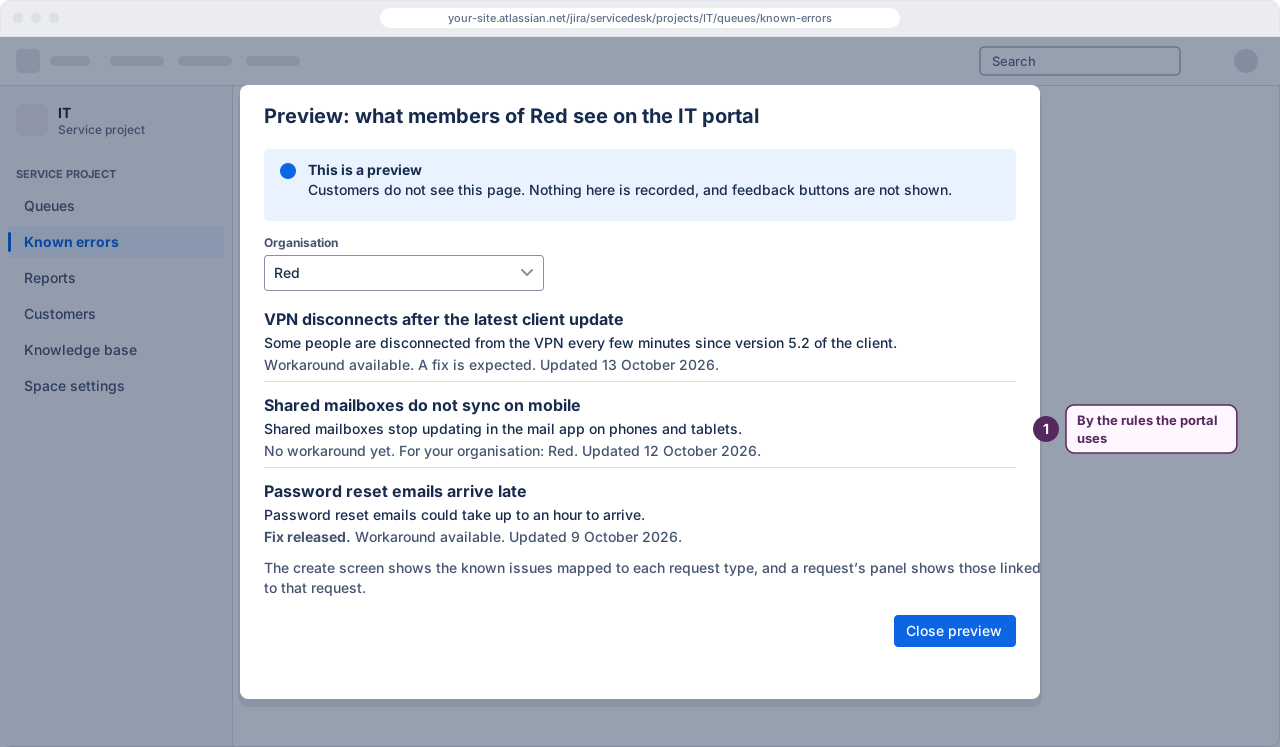
On the Known errors workbench, Preview as organisation shows the known issues an organisation’s members see on this service project’s portal list. It records nothing and shows no feedback buttons. While Atlassian-account customers are not being scoped, the preview says that members who sign in with an Atlassian account see only known issues for all customers.
 (opens the full-size illustration)
The preview shows the list. The create screen shows the known issues mapped to each request type, and a request’s panel shows those linked to that request.
Agents on the portal
An agent who opens the portal sees only known errors published to all customers, never those published to specific organisations, and a note saying so. To see what an organisation’s members see, use Preview as organisation.
One known error, one service project
A known error belongs to one service project, and appears only on that project’s portal. If you run a service project per client, each project has its own known errors. Known issues follow the service project, not the help centre.
Kenvara does not appear on Customer Service Management support sites.
Offboarding a client
When a client leaves, or someone leaves a client:
- Decide what happens to their known errors first. On the workbench, filter by status Published and open each known error published to that organisation. Unpublish or retire the ones only they should have seen, or use “Publish changes to KE-12…” to publish it to a different audience.
- Remove each member from the organisation explicitly, in Jira Service Management. Removing an email domain from an organisation does not remove the people already in it: in Kenvara’s own testing, an account that joined through a domain stayed a member after the domain was removed.
- Do not rely on detaching the organisation from the service project. Kenvara checks that an organisation is attached when a known error is published, not on every page view, so a known error already published to a detached organisation stays visible to its members. Step 1 is what removes it.
- Wait the membership cache time, then check: preview the organisation, and, if you can, look at the portal as one of its former members.